
Conversions API Gateway Explained for Ad Teams
Understand Conversions API Gateway, how it works, and why server-side tracking matters for accurate ad performance.
Conversions API, Server-Side Tracking, Ad Tech, Marketing Attribution, AdOps
Conversions API Gateway is a self-serve, cloud-hosted bridge that runs on your infrastructure to forward server-side conversion events directly to ad platforms, bypassing browser tracking limitations. Meta supports AWS EKS, AWS App Runner, and GCP GKE for this setup.
Your campaign dashboard may show fewer purchases than your checkout system records. The pixel fired for some visitors, failed for others, and left your team arguing about whether performance declined or measurement just broke. A gateway addresses that delivery gap, but it doesn’t repair incomplete events, weak identifiers, or careless tagging.
Table of Contents
- Why Browser Tracking Loses Conversions
- What Is a Conversions API Gateway?
- Gateway vs. Standard Pixel vs. Basic CAPI
- Mapping the Gateway to Major Platforms
- Capacity Planning and Scaling
- Security, Privacy, and Data Quality
- Integrating with AdOps Toolkits
Why Browser Tracking Loses Conversions
An ad team sees a familiar mismatch. The landing page works, checkout completes, and the CRM stores a customer record. Yet the advertising platform reports fewer conversions. Campaign settings may look unchanged, while cost per acquisition rises and automated bidding receives less information.
A purchase can disappear before the platform processes it. Browser tracking relies on the page loading correctly, the visitor allowing the request, and the browser permitting communication with the ad system. Content blockers, privacy controls, interrupted sessions, and implementation errors can break that chain.
Practical rule: Separate a business decline from a measurement failure before changing bids, budgets, or creative.
The useful mental model is a delivery path. A visitor clicks an ad, reaches the site, completes an action, and triggers an event. If the browser never sends that event, the platform receives an incomplete account of what happened. The sale still exists in the order system, but the optimization system cannot connect it with the campaign that influenced it.
Where the gateway helps
A server-side connection moves delivery responsibility away from the browser. Meta describes Conversions API Gateway as a self-serve product in Events Manager that runs on customer-owned cloud infrastructure and sends events through a server-to-server connection. That gives valid events a more dependable route, but it does not make incomplete or poorly defined events accurate.
The distinction matters during diagnosis. If the order database records a purchase and the event design includes the needed information, a server route can help deliver that event when browser tracking is unavailable. If checkout never creates a purchase event, the gateway has nothing to forward. It is a delivery pipe, not a data-quality repair tool.
Capacity planning also differs from traditional web analytics. Analytics teams often focus on pageviews, sessions, and reporting queries. Gateway planning must account for the event stream being accepted, logged, monitored, and delivered to the advertising platform, including traffic peaks and operational limits. The pipe must handle the flow without changing what the source system sends.
The browser still provides page context and interaction signals. A stronger architecture uses browser and server collection together, with clear event ownership and testing, rather than expecting one channel to correct every failure.
What Is a Conversions API Gateway?
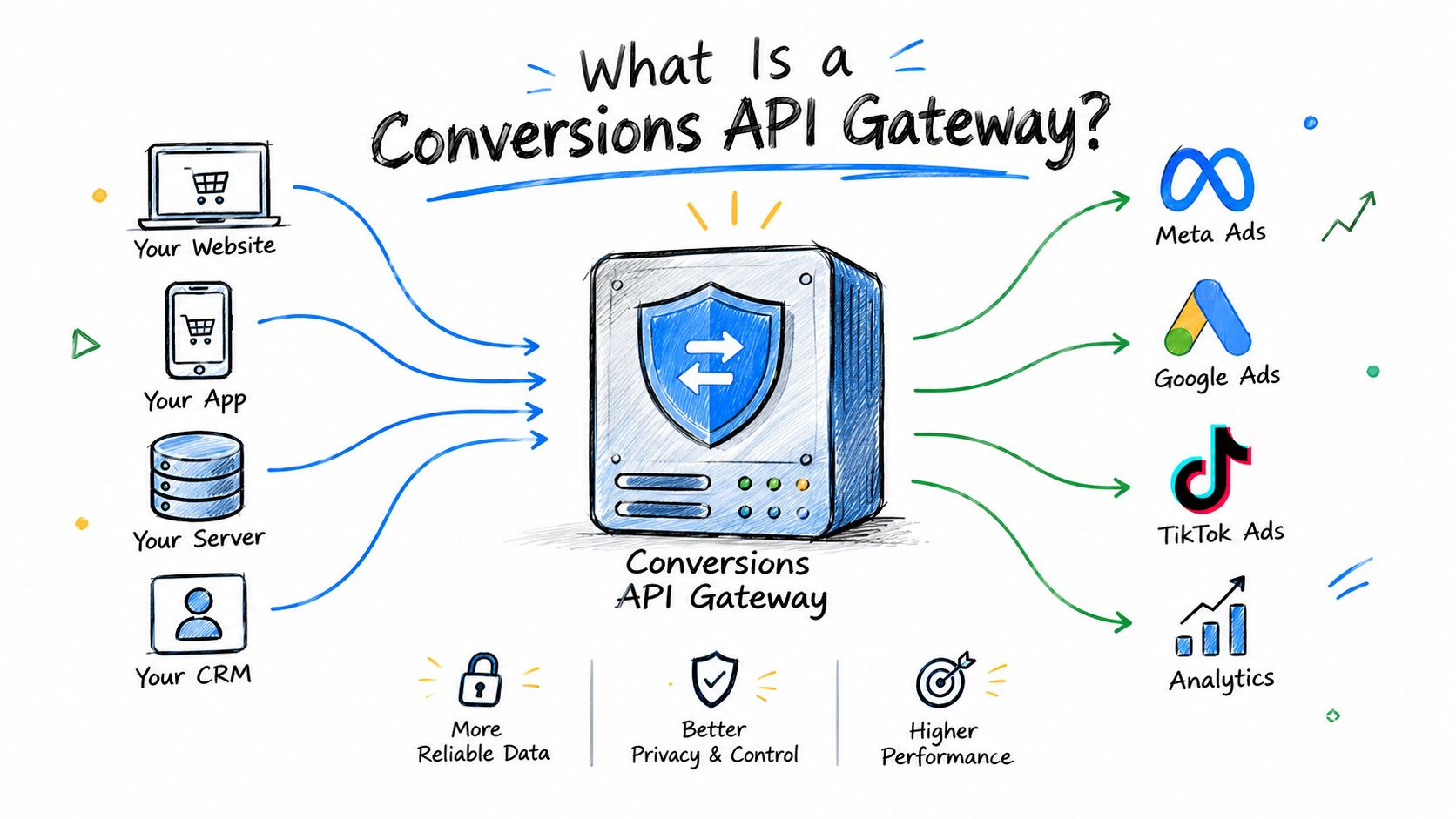
A Conversions API Gateway is a relay between event collection and an advertising platform. It works like a postal service with a controlled sorting center: a website or another source creates an event, the gateway receives and routes it, and the platform accepts it for processing.
The architecture has three layers:
- Client collection: A pixel or site implementation observes actions such as a product view, lead submission, or purchase.
- Gateway processing: The gateway runs on your cloud infrastructure, accepts the event stream, keeps operational logs, and provides event statistics for monitoring.
- Platform delivery: The gateway sends the event to the advertising system through its server-side endpoint.
Why the routing model matters
A direct browser request depends on software controlled by the visitor’s device and browser. A gateway moves the delivery step to a server-managed location, reducing reliance on that browser path. Server-to-server delivery can provide a steadier route for web events, while gateway logs and event statistics help teams troubleshoot after deployment. They show whether the pipe is active, rather than leaving campaign reports as the only signal.
Customer-owned deployments can use AWS EKS, AWS App Runner, and GCP GKE. That choice determines who manages the environment, credentials, access controls, and operating responsibilities.
The gateway does not define your marketing measurement. It does not decide which events should exist, whether a lead is qualified, or whether a purchase value is correct. It transports the payload supplied by the source system.
A useful boundary
A code-free setup can make configuration easier than building a fully custom integration. Teams still own event definitions, consent handling, testing, and monitoring. The product’s role is operational: receive, record, and deliver the events that have been configured.
This boundary also changes capacity planning. Traditional web analytics often centers on pageviews, sessions, and reporting queries. Gateway planning must cover the event stream accepted, logged, monitored, and delivered to the advertising platform, including traffic peaks and operational limits. A larger pipe can move more payloads, but it cannot repair missing fields or invent an event that the source never created.
If the source event is incomplete, the gateway provides dependable delivery of incomplete information. That is the central distinction when evaluating it.
Gateway vs. Standard Pixel vs. Basic CAPI
These three methods solve different operational problems. A standard pixel is simple to deploy but depends on the browser. Basic Conversions API sends events from your servers, but your team must build the collection, transformation, authentication, retry, monitoring, and maintenance layers. The Gateway sits between those choices as a pre-built delivery layer.
| Method | Reliability | Maintenance Effort |
|---|---|---|
| Standard pixel | Exposed to browser conditions and client-side blocking | Low initial effort, ongoing tag governance |
| Basic CAPI | Strong server-side delivery when implemented correctly | High, because your team owns the integration and operations |
| Conversions API Gateway | Server-side delivery with gateway logging and configured capacity | Moderate, with cloud and event-management responsibilities |
The table is a decision aid, not a promise that one option fits every stack. A pixel may remain useful for browser context. Basic CAPI may be appropriate when your engineering team needs complete control over event transformation or wants one custom pipeline for many destinations. The Gateway makes sense when you want a managed path without writing all of that middleware yourself.
What changes in practice
With the standard pixel, the browser is both collector and messenger. A page script captures the event and sends it directly to the destination. Your main maintenance burden is tag configuration, consent behavior, and debugging in the client.
With basic CAPI, your application or data infrastructure creates a server event and sends it to the platform. You control the payload and routing, but you also inherit operational details such as credentials, retries, error handling, and observability.
The Gateway narrows the infrastructure burden. Meta describes it as a self-serve configuration in Events Manager that runs on customer-owned cloud infrastructure, so “managed” doesn’t mean “owned by Meta.” Your team still needs to protect access, review logs, validate payloads, and understand the cloud environment.
A more reliable pipe can’t compensate for a badly designed measurement plan.
Choose based on responsibility, not fashionable terminology. Ask who owns event creation, who owns delivery, who responds when events stop arriving, and whether the team can inspect the payload before blaming the campaign.
Mapping the Gateway to Major Platforms
A shared plumbing model can simplify multi-platform operations, but it doesn’t erase platform differences. Each advertising network has its own event schema, authentication method, accepted identifiers, and quality checks. The gateway or surrounding integration must translate and deliver data according to each receiver’s requirements.

A practical connection sequence
-
Define the source event. Start with the business action, such as a completed order or submitted lead. Record the event name, time, value, currency, consent status, and available identifiers in a consistent data contract.
-
Connect the destination. In Meta, configure the Gateway through Events Manager and associate it with the relevant dataset or event destination. For TikTok or Google Ads, verify that the chosen server-side product or connector supports the events and fields you need. Don’t assume a Meta-specific Gateway automatically becomes a universal endpoint for every platform.
-
Map fields deliberately. A purchase event may use different names or required fields across providers. Create a mapping document rather than copying a payload blindly. Keep platform-specific credentials and destination settings out of browser code.
-
Test before scaling. Send controlled test events, compare source records with destination diagnostics, and confirm that consent rules are respected. Check timestamps, values, event names, and identifiers separately.
-
Monitor the shared pipe. Once live, inspect gateway logs and platform diagnostics. A single source pipeline can reduce duplicated collection work, but it also creates a shared dependency. An error in the source contract can affect every connected destination.
Teams operating campaigns across networks may also benefit from ad platform automation workflows that turn clean performance data into controlled operational actions. Automation should follow validation, not replace it.
One pipeline, several receivers
The advantage is consistency in the plumbing. Your order system can produce one governed event, while destination adapters handle the requirements of Meta, TikTok, or Google Ads. That gives ad operations a common place to inspect delivery and reduces the temptation to maintain unrelated browser tags for every channel.
The limitation is equally important. A gateway doesn’t guarantee that all platforms interpret a shared event identically. Keep a destination-level checklist for authentication, event naming, consent, matching, and diagnostics.
Capacity Planning and Scaling
Website scaling and conversion-event scaling aren’t the same problem. A website usually responds to page requests, while a gateway must receive, process, queue, and deliver event messages reliably. A successful page load doesn’t prove that the corresponding conversion payload reached the advertising platform.
Meta documents that Gateway server capacity is determined by the maximum number of instances configured, either during installation or later in the Gateway Admin UI. That makes capacity planning instance-based rather than purely request-based. Your operational lever is the provisioned instance configuration, not just a vague expectation that infrastructure will absorb every spike.
Think in event flow
Start with the events that matter most to optimization. A purchase event may deserve stricter monitoring than a low-value page view because a delivery delay can affect reporting and bidding decisions. Then examine the gateway’s operational logs and event statistics for signs of backlog, errors, or uneven processing.
Before a major promotion, review:
- Expected event pressure: Identify campaigns, launches, and promotions likely to increase conversion-event volume.
- Configured capacity: Confirm the maximum instance setting and who can change it.
- Failure behavior: Know how the team will detect delayed or rejected events.
- Recovery ownership: Assign a person to investigate delivery issues and reconcile source records.
If the event stream grows beyond the configured capacity, the result can be delayed processing or an event backlog. Increasing the configured instance capacity can provide more room for throughput and resilience, but it isn’t a substitute for a tested event contract or a stable destination connection.
Operational insight: Scale the delivery layer before the business event arrives, not after the dashboard starts missing conversions.
The broader discipline resembles capacity planning for DevOps teams, where teams connect expected demand with provisioned resources and monitoring. The difference here is the business consequence. A delayed web request may frustrate a visitor, while a delayed conversion event can distort campaign decisions even when the sale itself completed.
Treat capacity as part of campaign readiness. Record the configured instance ceiling, establish alert ownership, and test the process for increasing capacity. That turns a cloud setting into an accountable ad-operations control.
Security, Privacy, and Data Quality
A gateway can improve delivery without improving truth. It forwards the information available to it, so a missing purchase value, incorrect event name, weak identifier, or broken trigger remains a problem after the event moves server-side. Independent guidance makes this distinction clearly: Conversions API Gateway addresses delivery rather than data quality.
That principle should shape implementation order. First define what the business considers a conversion. Then verify that the source captures it consistently, that consent controls determine whether it may be sent, and that the payload contains useful context. Only after those checks should you assess whether the Gateway improves delivery reliability.
Protect the payload
Server-side routing can keep platform credentials and transformation logic away from client-side code. It can also give your team a controlled place to apply privacy rules before transmission. That control doesn’t remove legal or governance obligations, and it doesn’t make sensitive data safe by default.
Use a clear data policy:
- Minimize collection: Send fields needed for matching, attribution, or optimization, not every customer attribute available.
- Apply approved transformations: Hash or otherwise protect identifiers according to the receiving platform’s requirements and your privacy team’s policy.
- Respect consent: Suppress or alter events when the user hasn’t granted the relevant permission.
- Audit destinations: Record what leaves the gateway, where it goes, and who can change the configuration.
Data-in, data-out: The Gateway delivers the payload you design. It can’t infer a missing identifier or correct a tag that fired for the wrong action.
Teams that manage multiple server-side paths can use principles from data path management in AI systems to document access, movement, and control points. The same discipline helps ad operations teams understand where personal information enters the pipeline and where it leaves.
Privacy work also benefits from a documented ownership model. Your privacy and advertising data guidance should align marketing, analytics, engineering, and legal teams before launch. A reliable event is still inappropriate if the organization lacks permission to send it.
Integrating with AdOps Toolkits
Reliable conversion delivery becomes valuable when teams use it to make better decisions. The Gateway can improve the evidence available to ad operators, but the operating loop still needs a clear sequence: collect, validate, analyze, decide, act, and audit.
A practical workflow starts with the source system. Confirm that the order or lead record exists, then check the gateway’s event statistics and logs. Compare destination reporting with internal records, investigate discrepancies, and only then use the result to adjust campaign budgets, pause weak entities, or launch new tests.
Keep diagnosis separate from action
A clean operating model gives each layer a job:
- Measurement layer: Defines events, consent, identifiers, and source-of-truth records.
- Delivery layer: Routes events through the Gateway and exposes operational evidence.
- Analysis layer: Connects conversion data with spend, creative, audience, and campaign structure.
- Action layer: Applies approved changes to advertising accounts.
- Governance layer: Records who made each change, why it was made, and what happened afterward.
That separation prevents a common failure mode. A team sees a reporting dip, assumes campaign performance collapsed, and changes budgets before checking whether event delivery failed. Better data supports faster action, but only when operators verify the cause.
Teams evaluating broader marketing infrastructure can browse Sokko integrations to compare how external systems connect with their existing workflow. The important question isn’t how many connectors a tool lists. Ask whether it preserves event context, permissions, and an audit trail across the handoff.
The same principle applies when building an agent-assisted process. Give the agent governed inputs, explicit playbooks, constrained write permissions, and a record of every action. Reliable conversion signals should inform decisions, not trigger unreviewed automation.
For teams managing multiple advertising accounts, AdOps workflows provide the operational context around that signal. The Gateway handles delivery. Your toolkit should help people interpret the result, apply safe changes, and preserve accountability.
AdCrunch connects Meta, TikTok, and Google Ads through one ad-operations workspace, with agent connections, controlled Meta write actions, campaign planning, and a permanent activity log. Use the reliable event flow from your Conversions API Gateway to investigate performance and execute documented changes safely. Visit AdCrunch to connect your accounts and build a more accountable measurement-to-action workflow.